SASSA Grant Approved But No Pay Date What Do I Do?
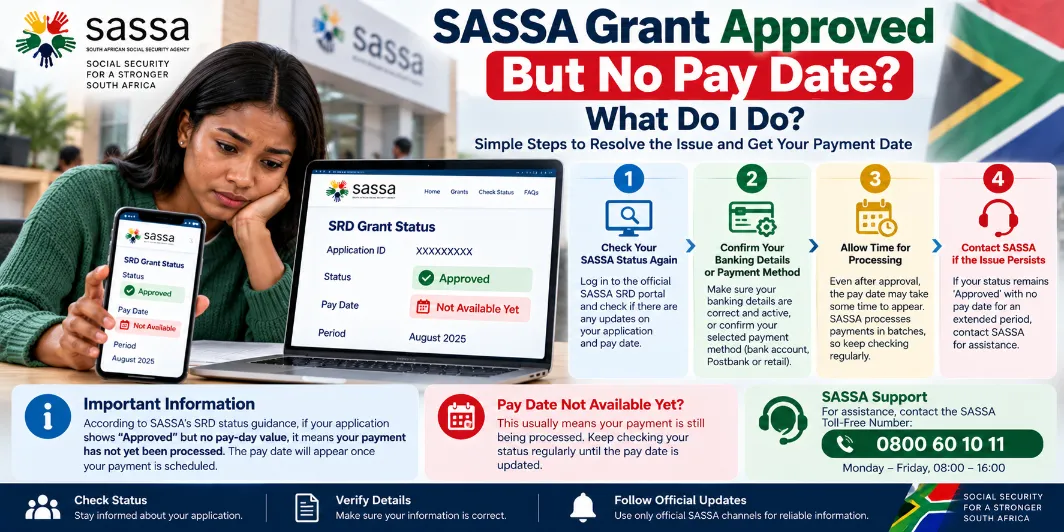
SASSA Grant Approved But No Pay Date What Do I Do? An approved grant means SASSA has accepted the grant for the relevant payment period, but an approved status alone does not always show a payment date. For SRD applications, SASSA states that an approved period should be checked through the pay-day field. A blank pay-day field means payment has not yet been processed.
A missing pay date can cause concern, especially for applicants waiting for money for food, transport, household costs, or other daily needs. A blank date does not automatically mean that the grant has been cancelled or rejected.
What Does Approved Mean on SASSA Status?
An approved status means the application passed the relevant checks for the payment period. For SRD, SASSA separates the approval status from the actual payment processing stage.
The status may show:
- Approved
- Approved with no pay date
- Approved with a payment date
- Paid
- Declined
- Pending
- Cancelled
SASSA official SRD status guidance says an approved period should have a pay-day field. A blank field means payment has not yet been processed.
Why Does SASSA Show Approved But No Pay Date?
Several reasons can lead to an approved grant appearing without a payment date.
The payment system may still be processing the payment. Banking information may also need attention, or SASSA may still be preparing the payment for the selected period.
Common reasons are:
- Payment processing has not started.
- The pay date has not yet been assigned.
- Banking details need to be checked.
- A bank verification process may still be taking place.
- SASSA has approved the grant but has not released the payment yet.
- System updates may take some time to appear on the status page.
For SRD, SASSA specifically advises applicants to check the pay-day field after approval.
What Do I Do After SASSA Approves My Grant?
Start by checking your SASSA status again through the official status service.
Review the payment section for the relevant month. Look for a pay date, payment status, or banking message.
You can follow these steps:
- Open the official SASSA status service.
- Enter the requested personal details.
- Select the relevant payment period.
- Check the grant status.
- Look for the pay-day field.
- Check your banking details.
- Check your bank account for incoming funds.
- Check the status again later for an update.
SASSA advises SRD applicants to check their verification and payment status through the official service.
SASSA Approved But No Pay Date for SRD
SRD applicants can see approval for a particular month without a payment date. This does not mean the approved amount has already reached the bank account.
SASSA’s own status document gives a direct explanation: an approved period means the application was approved for that period, while a missing pay-day value means payment has not yet been processed.
This makes the pay-day field important. An applicant should focus on the payment information for the specific month rather than relying only on the word “Approved.”
What Does a Blank Pay Date Mean?
A blank pay date generally means that SASSA has approved the relevant period but has not processed the payment yet.
| Status | Meaning |
|---|---|
| Approved | Grant approved for the relevant period |
| Approved, no pay date | Payment has not yet been processed |
| Approved with pay date | A payment date has been assigned |
| Paid | Payment has been processed |
| Declined | Application did not qualify for that period |
| Pending | Verification or processing remains incomplete |
For SRD, SASSA directly states that no pay-day value means no payment has been processed yet.
Should I Wait for the Pay Date?
Yes, a short processing delay can happen after approval. Keep checking the official status page rather than assuming that the approval has disappeared.
There can also be a gap between approval and payment processing. The official SASSA status guidance separates approval from the payment stage, so an approved status alone does not provide proof that money has already been sent.
During this period:
- Check the status regularly.
- Check your bank account.
- Review your banking details.
- Keep your phone available for SASSA messages.
- Keep your application information safe.
- Contact SASSA should the delay become unusually long.
How Long Does SASSA Take to Add a Pay Date?
There is no single fixed waiting period that applies to every approved grant or every payment period. Payment processing can depend on the grant type, verification, banking information, and SASSA’s payment process.
For this reason, avoid relying on unofficial dates shared on social media. Your personal status page provides more relevant information for your payment.
What If the Pay Date Still Does Not Appear?
Start with another status check. A missing pay date can remain for a period before the payment information changes.
Contact SASSA for help should the status remain approved without payment information for an extended period.
SASSA lists its toll-free number as 0800 601 011. Its official FAQ says the helpline can provide information about payout dates, grant requirements, office contact details, and application issues.
Have these details ready:
- South African ID number
- Mobile phone number used for the application
- Grant type
- Relevant payment month
- Application or reference details
- Bank information, where relevant
Can I Contact SASSA About an Approved Grant?
Yes. SASSA provides support for grant-related enquiries through its service channels. The official SASSA Services portal also provides a Grant Support Request option for complaints, enquiries, and other assistance.
Keep your reference details ready before contacting an office or the helpline. This can make the enquiry easier to handle.
What If My Bank Account Has No Money?
An approved status does not always mean the money has already reached your account.
First, check the payment date on your SASSA status. Next, check your bank account and recent transactions.
Use this checklist:
- Approved status confirmed
- Pay date checked
- Bank details checked
- Bank account checked
- Payment month confirmed
- SASSA contacted for prolonged delays
A bank balance with no grant payment can occur simply because payment processing has not yet taken place.
Can SASSA Approve a Grant Without Paying It?
Approval and payment are separate stages. SASSA’s SRD status guidance makes this distinction clear: an approved period can have no pay-day value, and the missing date means payment has not yet been processed.
For other social grants, SASSA’s grant information states that approved grants are paid from the applicable grant award date, subject to the relevant grant rules.
What Should I Avoid Doing?
Avoid making unnecessary changes to your application or banking information simply because a pay date has not appeared.
Also avoid:
- Giving your PIN to another person.
- Sharing banking passwords.
- Paying anyone who promises faster SASSA payment.
- Using unofficial websites for status information.
- Sharing OTP codes with strangers.
- Repeatedly changing bank details without a valid reason.
SASSA advises grant recipients to protect their banking information and report suspicious activity through its official channels.
SASSA Grant Approved But No Pay Date: Main Points
The main points are simple:
- An approved status means the relevant grant period has received approval.
- A missing pay date does not automatically mean rejection.
- For SRD, a blank pay-day field means payment has not yet been processed.
- Check your status again later.
- Review your banking details.
- Check your bank account for the payment.
- Contact SASSA for prolonged payment issues.
- Use the official SASSA contact number rather than unofficial payment agents.
Final Answer
SASSA Grant Approved But No Pay Date What Do I Do? Start by checking the status for the relevant payment period and look at the pay-day field. For SRD, SASSA confirms that an approved period without a pay-day value means payment has not yet been processed.
There may be a gap between approval and payment processing. Check your banking details, monitor your bank account, and check the status again. For a prolonged delay, contact SASSA on 0800 601 011 for assistance.