SRD Change Cellphone Number Online
The SRD Change Cellphone Number Online service lets SASSA applicants update the mobile number linked to their Social Relief of Distress application. SASSA provides a dedicated option on the official SRD website for applicants who need to replace an old, lost, inactive, or incorrect cellphone number.
The registered mobile number matters because SASSA uses the contact details supplied by the applicant for grant-related communication. SASSA’s SRD declaration also states that applicants must update their contact details after a change.
SRD Cellphone Number Change Online
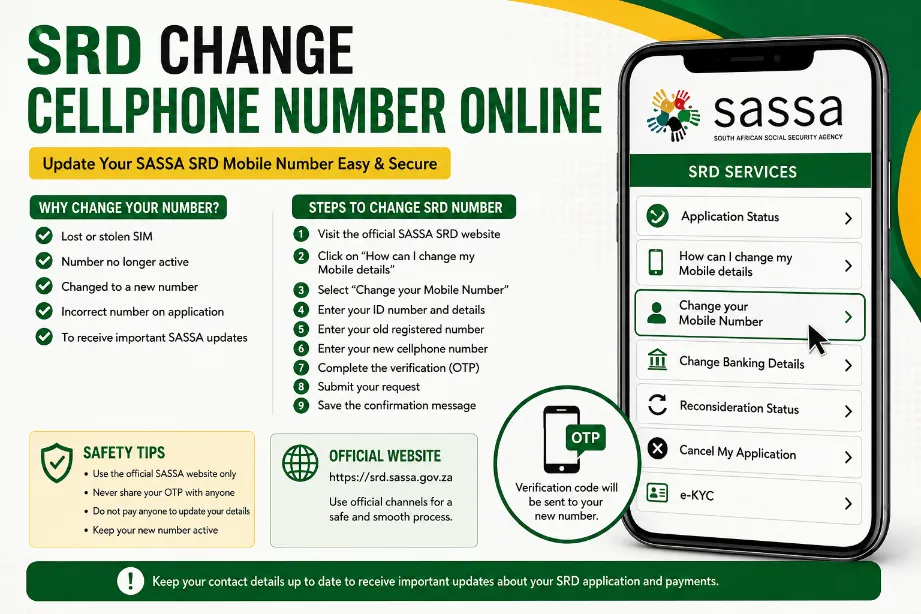
Applicants can access the official SASSA SRD portal and select the option for changing mobile details. The portal lists “How can I change my Mobile details” and provides a dedicated button for changing the linked mobile number.
Steps to Change SRD Cellphone Number
Follow these steps to submit the new mobile number:
- Open the official SASSA SRD website.
- Go to the section for changing mobile details.
- Select Change your Mobile Number.
- Enter the requested personal information.
- Provide your existing registered cellphone number.
- Enter the new cellphone number.
- Complete the verification process shown on the portal.
- Submit the request.
- Save any confirmation or reference information displayed after submission.
SASSA provides this facility directly through its SRD portal, so applicants do not need to rely on unofficial websites for the number update.
Information Required for SRD Mobile Number Update
Have the following information available before starting the request:
| Information | Purpose |
|---|---|
| South African ID details | Applicant identification |
| Old cellphone number | Existing SRD contact record |
| New cellphone number | Replacement contact number |
| Personal application details | Application verification |
| Access to the new phone | Receiving verification communication |
The exact fields shown on the SASSA page may vary according to the current portal process.
Why You May Need to Change Your SRD Number
A mobile number update may be necessary for several practical reasons:
- Your old SIM card was lost.
- Your previous number became inactive.
- You changed your mobile network number.
- You entered an incorrect number during your SRD application.
- You no longer have access to the number linked to your SRD record.
- You want SASSA communication sent to your current cellphone.
SASSA’s SRD declaration states that the supplied mobile number serves as the communication channel for the grant and that applicants must update it after a change.
Can I Change My SRD Number Online?
Yes. SASSA provides an online mobile-details option specifically for applicants with an existing SRD application. The official SRD landing page directs applicants to a Change your Mobile Number option.
This process can save a visit to a SASSA office, provided the online verification process works successfully.
What Happens After Changing the Number?
After submitting a new cellphone number, SASSA may verify the details linked to the application. Keep access to the new number during the process so that required verification messages can reach you.
A successful number update does not automatically mean that an SRD payment has been approved. SASSA checks applications separately through its verification and payment processes. The official status guidance lists statuses such as Application Complete, Pending, Approved, Declined, Bank Details Pending, and Canceled.
SRD Number Change and OTP Verification
Verification can form part of SASSA’s digital services. The SASSA Services FAQ states that OTP verification may be used for account and personal-information updates.
For this reason, applicants should keep the new cellphone available during the update process and enter verification details only on the official SASSA website.
Problems With SRD Change Cellphone Number Online
Some applicants may experience problems during the mobile-number update process. Common situations include:
- The old number no longer works.
- The verification message does not arrive.
- Personal details do not match the SASSA record.
- The website does not accept the submitted information.
- The new number cannot receive the required verification message.
- The applicant has already submitted another mobile-number request.
Try checking the entered details carefully and use the official SRD portal again. Avoid submitting personal information through links received from unknown sources.
Can Someone Else Change My SRD Number?
Your SRD cellphone number forms part of your personal application information. SASSA states that personal information supplied during the SRD process must remain accurate and current, and applicants agree to update changed personal details.
Do not give your ID details, OTP, banking information, or other private information to strangers claiming to update your SASSA application.
SRD Mobile Number Change Safety Tips
Keep these points in mind:
- Use the official SASSA SRD website.
- Never pay a person for a basic online number update.
- Do not share an OTP with another person.
- Check the website address before entering personal details.
- Keep access to the new cellphone number.
- Save confirmation details after completing the request.
- Check your SRD status through the official portal after the update.
SASSA also advises applicants to report suspected grant fraud or corruption through its official channels.
SRD Change Cellphone Number Online and Grant Payments
Changing a cellphone number does not replace the process for updating banking details. SASSA lists mobile details and banking details as separate online services on its SRD portal.
| Request | Online service |
| Cellphone number | Change Mobile Number |
| Banking information | Change Banking Details |
| Application status | Application Status |
| e-KYC | e-KYC |
| Reconsideration | Reconsideration Status |
| Application cancellation | Cancel My Application |
A cellphone update therefore should not be treated as a banking-information update.
What to Do After the Number Change
After completing the request, check your SRD application status through the official SASSA portal. The status page provides information about application progress, approval, payment information, pending verification, or a declined application.
Keep your new number active and accessible. This helps you receive future SASSA communication linked to your application.
Final Notes for SRD Cellphone Number Update
The SRD Change Cellphone Number Online facility gives existing SASSA SRD applicants a direct way to update their linked mobile number. SASSA provides the service through its official SRD website, alongside application status, e-KYC, banking details, reconsideration, and other application services.
Use the official portal, provide accurate information, complete the requested verification, and retain any confirmation details after submitting the new cellphone number.
How do I change my SRD cellphone number online?
Visit the official SASSA SRD website and select Change your Mobile Number under the mobile-details section. Complete the requested information and submit the update.
Can I update a lost SRD cellphone number?
Yes. SASSA provides an online mobile-details service for applicants who need to change the cellphone number linked to their SRD application.
Do I need the new cellphone number?
Access to the new number is advisable because SASSA may require verification during its digital process.
Does changing my cellphone number change my SRD status?
No. A mobile-number update and application-status assessment are separate processes. SASSA verifies SRD applications through its own assessment and payment procedures.
Can I change my banking details through the same option?
No. SASSA provides a separate Change Banking Details service on the SRD portal.
Is there a fee for changing the SRD cellphone number?
Applicants should use the official SASSA online service rather than paying an agent or third party to submit the request.